

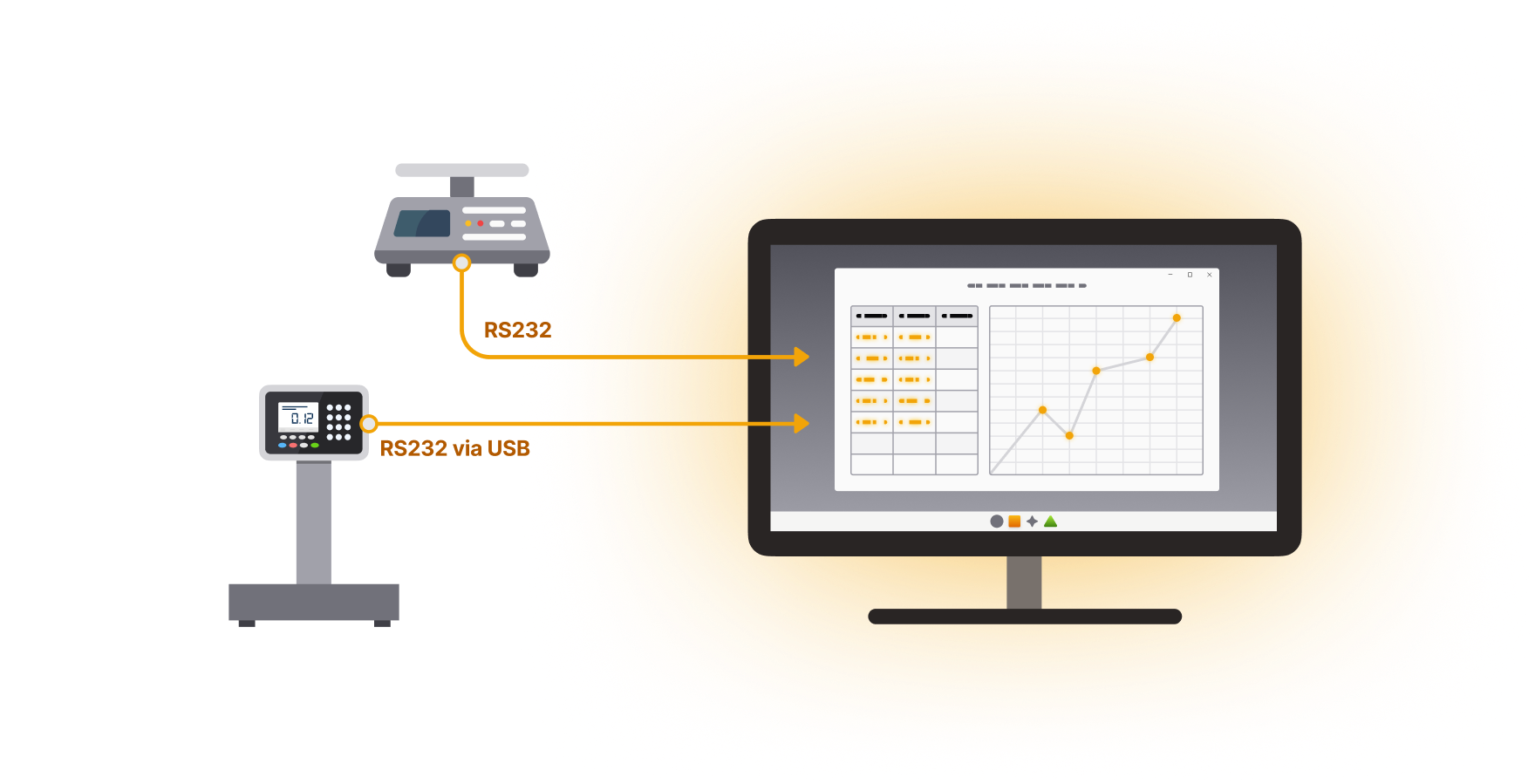
WinWedge software inputs data from any RS232, USB or Ethernet output device (including scales and balances) directly into Excel, or any Windows application. It can also transmit prompts or commands to control your instruments.
Eliminate manual data entry and streamline your data collection process. Send commands to control your devices on timed intervals, or with keyboard shortcuts or onscreen buttons.
Only collect the data that you need with powerful data parsing capabilities. Tailor your data to fit your destination application or form with our precise formatting and filtering settings.
WinWedge is used across many industries. It supports thousands of devices and connection methods including serial, USB (via RS232), Bluetooth (via virtual COM port), and local networks (TCP/IP).
Device data is automatically transferred to your Windows application with 100% accuracy. Perfect for process control, quality control, pharmaceutical and other “mission critical” data.
WinWedge easily collects data from balances, scales, gages, meters, gages, sensors, and measuring devices and laboratory instruments.
Designed to be highly flexible, WinWedge can easily parse, filter and format your device data before inputting the data into any of your Windows applications. In other words, WinWedge is an easily customizable serial I/O device driver.
WinWedge comes in both Standard and Professional versions.
WinWedge Standard collects data from serial, RS232, and RS232-via-USB professional instruments.
WinWedge Pro is compatible with a wider range of devices than WinWedge Standard. It supports devices with longer and more complex data output, network/Ethernet-connected devices, and RS232 and USB devices. WinWedge Pro also offers more control options and can handle binary, hexadecimal, and ASCII output.
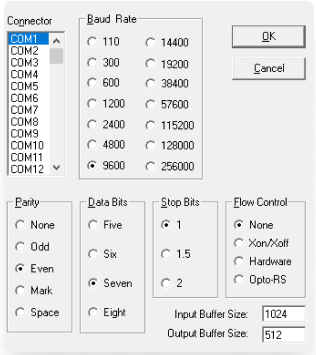
Connect your device to your PC’s serial or USB* port and select your device’s communications settings, such as the COM port, baud rate, parity, data bits, and stop bits.
*Be sure to install any necessary drivers.
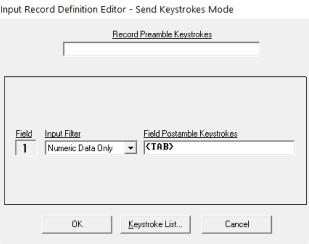
Walkthrough menus allow you to tailor the data to your needs by splitting the record into multiple fields, filtering out characters, or formatting the data as needed.
Easily define hot keys and buttons to send serial commands to your device or control WinWedge.
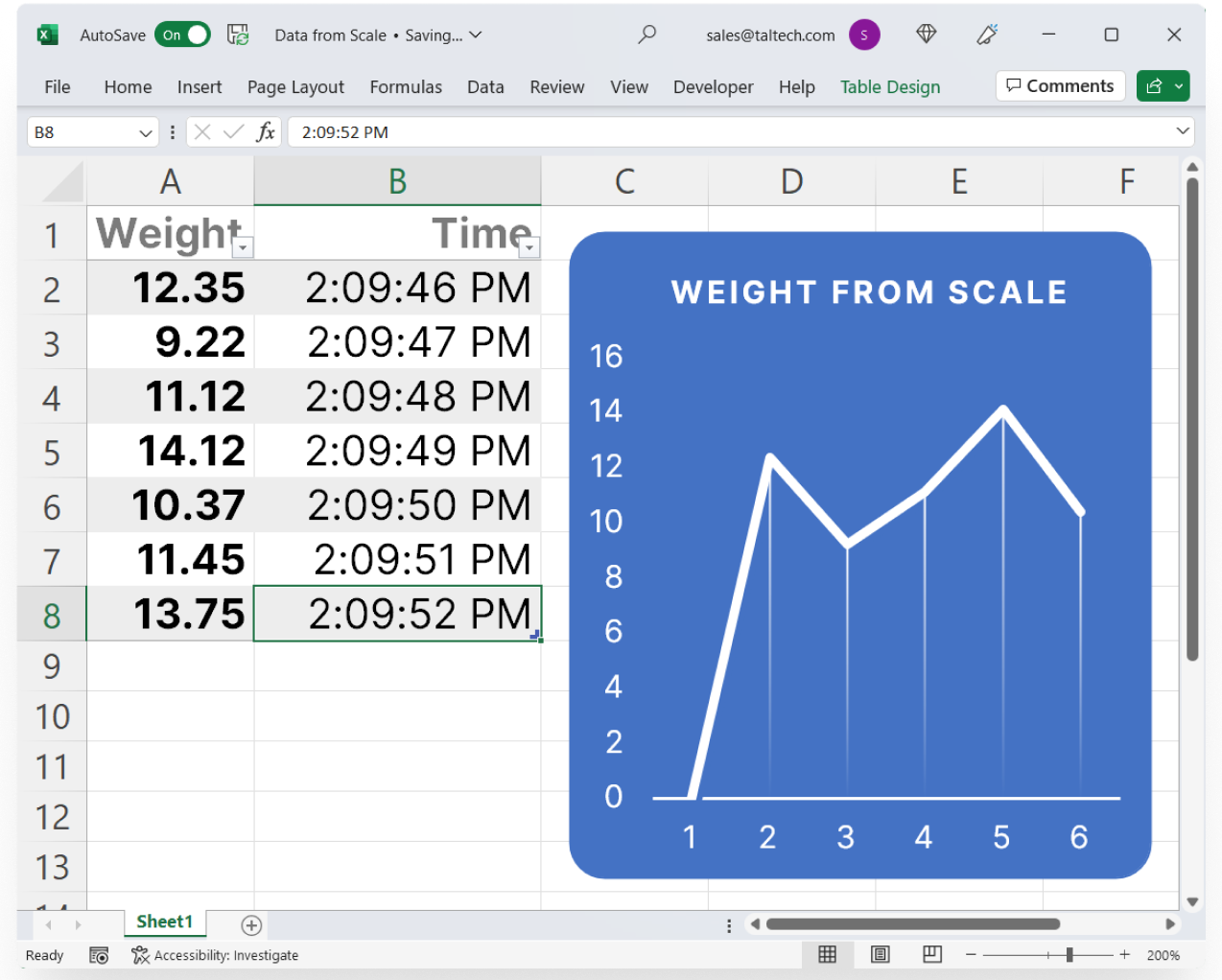
Select from either Keystrokes Mode or DDE Server Mode and activate WinWedge. Watch as the real-time data from your device pops into your Windows. You can even do real-time data charting and analysis in applications such as Excel.







WinWedge Pro is compatible with more devices and offers more powerful data parsing, formatting, filtering, and control features.
| Supported connection types | WinWedge Standard | WinWedge Pro |
|---|---|---|
|
Serial Devices (e.g., RS232, RS485) |
|
|
|
USB devices with virtual COM port drivers (RS232 via USB) |
|
|
|
TCP/IP (network) devices |
|
|
|
Maximum number of simultaneous connections |
16 |
100 |
|
Support for high-speed 16550 UARTs and all IRQs |
|
|
|
Support for up to 115,200 baud communications |
|
|
| Preview and test your device configuration | WinWedge Standard | WinWedge Pro |
|---|---|---|
Preview the raw data output from your deviceA powerful Serial Data Analyzer feature allows you to preview serial data and adjust communications settings. Customize parameters such as baud rate (110-115,000); data bits (5, 6, 7, 8); stop bits (1 or 2); parity (even, odd, mark, space, or none); and flow control (hardware or software).
|
|
|
Create virtual devicesActivate in Virtual Instrument Mode to create a virtual device.
|
|
|
Resize the Analyze window for long data recordsAllows you to view long data records in the Analyze Window.
|
|
|
| Transfer data to any Windows app or form | WinWedge Standard | WinWedge Pro |
|---|---|---|
Transfer data via keystrokes to any Windows applicationSend data to any windows program directly to the location of your cursor or a selected area.
|
|
|
Transfer data via Dynamic Data Exchange (DDE) in supported Windows applicationsTransfer data through the background to any Windows program that accepts DDE commands, such as Microsoft Excel and Access.
|
|
|
Automatically Update a Chart in ExcelLog data down a column or row in Excel and watch your graph update automatically.
|
|
|
Insert data into an Access form or tableAutomatically send device data to a specific form field in Access, even if the user doesn’t have it selected.
|
|
|
Selectively ignore fields and filter numeric dataInput only the data you need, ignoring the rest.
|
|
|
Split data into multiple fieldsFormat incoming serial data before passing it on to another app, tailoring it to appear exactly as needed by the receiving application.
|
|
|
Send additional keystrokes to your applicationDefine keystrokes like “Enter” or “Tab” to be sent to your application along with your device’s data.
|
|
|
Date and time stampingPlace date and time stamps directly in your serial input data.
|
|
|
Log data to a background file while workingCollect data to a file in the background while another program is in the foreground.
|
|
|
| Control your device from your PC | WinWedge Standard | WinWedge Pro |
|---|---|---|
Create onscreen buttons to send commandsConfigure up to 20 buttons with specific commands for your device.
|
|
|
Automatic data acknowledgementHave WinWedge send a string back to the serial device after receiving each data record.
|
|
|
Timer-controlled outputConfigure a timer to automatically send a command, Toggle the DTR line, or issue a break signal.
|
|
|
Customize hotkeys / keyboard shortcuts to control WinWedgeDefine up to 50 hotkeys to transmit commands or control common WinWedge functions.
|
|
|
|
Assign multiple functions to a single hotkey |
|
|
| Advanced features | WinWedge Standard | WinWedge Pro |
|---|---|---|
Filter out or translate characters before input or before transferTranslate or remove specific characters either before WinWedge processes them or before your destination receives them from WinWedge.
|
|
|
Select input and output buffer sizesSupports 128 bytes to 32K buffer size.
|
|
|
Advanced data parsing, filtering, and formattingAdvanced techniques to give you ultimate control of sophisticated data structures.
|
|
|
Apply powerful math functionsApply standard and many advanced math functions to incoming serial data.
|
|
|
Translate binary or HEX data to ASCIICommunicate with devices that send data in Binary or Hex format.
|
|
|
Tailor data with powerful formatting functionsFormat incoming serial data before passing it on to another program. Custom-tailor your data to appear in the exact format required by the receiving application.
|
|
|
Advanced keystroke macro insertionAdd additional keystrokes or keystroke macros before, after, or within your serial input data. Keystroke macros allow you to control where and how serial data appears in the target application program in Keystroke Mode.
|
|
|
Add delay before and after keystrokesPause between keystrokes and data to allow for the processing time of your application.
|
|
|
Send keystrokes to a DOS or terminal serverSend keystrokes directly into DOS windows or applications running through terminal servers.
|
|
|
| Flexibility with Dynamic Data Exchange (DDE) | WinWedge Standard | WinWedge Pro |
|---|---|---|
Access to full set of DDE commandsPrecise control over all serial I/O functions directly from within your other Windows application programs.
|
|
|
Send a DDE command to your applicationDefine a single DDE Command to be sent to your application when WInWedge receives a new record.
|
|
|
Send multiple DDE commands to applicationsConfigure “Record Preamble” and “Field Postamble” DDE Commands to be sent to your application each time WinWedge receives a reading.
|
|
|
Create serial output buffersPlace a Serial Output Buffer directly in any application that supports DDE. For example, you can turn a cell in a spreadsheet into a serial output buffer where anything you type in that cell would be sent out through the serial port to your device.
|
|
|
Laboratories & Scientific Research
Quality Control
Medical Devices
Cannabis Compliance
Farming & Fishing
Process Control
Food Processing
Manufacturing Automation
Government & Military
Engineering
WinWedge and WinWedge Pro are used to collect all sorts of data across many industries.
Our Users

How efficient and easy-to-use your WinWedge program is! Obtaining data from our gauges is now a trivial task.
Lucas Girling, S.A
WinWedge works GREAT! I love this program! It has saved me hours of research and programming time!
Hamilton, Ontario
WinWedge is exactly the tool we need for collecting data from all our instruments. It is extremely easy to use, providing a transparent serial interface into Excel®. Perfect for data collection.
Lab. Coordinator, Physics Dept., Colorado State
I never thought it would take less than 15 minutes to get WinWedge collecting data from my instruments.. I have not been this satisfied with a software product in years.
Leaseplan
TALtech provided unbelievable technical support, the best I’ve ever had. The support engineer went above and beyond anything I expected. Fantastic support.
Harris Rebar
In 20 years of technical work, I have been involved with many technical support personnel and TALtech the best. Thanks again.
Dupont
Great Product! – What a time saver! We’ll be buying more.
Becton Dickinson
We are very pleased with the software and its ease of use. We would recommend it to anyone requiring serial transfer into existing programs.
Crest Industries
I appreciate the ease of use and direct link to Excel.
President, Clinical Research Services
Software works Great.
Sr. Systems Analyst, Boeing
Excellent Software Package!
Teagasc, Grange R & D Center
As our young engineer said, ‘this software kicked major butt!’
Alcan Packaging
Loved It! Easy Setup.
Microtek Labs
Excellent program, easy to learn, with a wide range of applications.
Florida Production Engineering
Excellent package, easy-to-use, a great time-saver.
J.Roy Gordon Research Lab
Great product. We’ll be buying additional copies for new systems.
Allied Signal Aerospace
This software has saved me many programming hours.
Analytical Lab
Your excellent product, WinWedge, works as advertised. It’s nice to know that the technical support is not just a website promise.
Datanet, Raleigh, NC
We offer an unconditional 60-day guarantee and free technical support with every software purchase.

Only $399 for a single PC license.
Discounted multi-license/PC pricing also available for any quantity.
Demos & purchases come with free, unlimited technical support.

WinWedge is licensed on a per-workstation / user basis.
Bulk pricing is available for multi-licenses used on multiple PCs or by concurrent users when installed on a server.

Not only is WinWedge extremely easy to use, it also comes with free & unlimited technical support by phone or email. All software comes with extensive support resources.

This software can be installed on all versions of Windows with minimal system requirements.

Yes. It is extremely easy to use! The configuration process is fully menu driven and has complete, context sensitive, on-line help. You can easily customize all input to your exact specifications.
Once you see how easy it is to use WinWedge, you will never again take data readings by hand!
Yes, we offer two different types of upgrades: software upgrades and license upgrades.
A software upgrade is an upgrade from a lesser version number to a newer version number (ex: WinWedge Pro 3 to WinWedge Pro 4). These are generally available for a reduced cost and can be ordered online. You must have a valid serial number for the older license in order to process the upgrade.
A license upgrade is an upgrade to a higher number of allowed PCs (ex: Single to Team license). These are always available for just the difference in cost between the two licenses. Contact us to get a quote or place an order.
WinWedge Professional has many advanced features and benefits, including the ability to collect data from networked and internet devices (not just serial!), log data directly to a disk file, and allows for more powerful parsing techniques and math functions.
WinWedge Professional also bundles together many of our popular software products into one package, including TCP-Wedge, TCP-Com, File-Wedge, and more.
WinWedge transfers data to other applications by either entering it in the highlighted text field or cell (just like typing on a keyboard) or by passing the data using DDE (Dynamic Data Exchange).
The keystroke method is extremely simple. Serial data just “pops” into your application as if it were being typed in! This method is the most popular as it is so easy to use.
The DDE method enables to you to transfer data in the background and create extremely sophisticated data acquisition and device control interfaces.
WinWedge also lets you add additional keystrokes or DDE commands and, if your application supports it (like Excel) you can even automate real-time data charting and analysis.
Yes, we provide a demo version of WinWedge Pro for testing & evaluation purposes only.
All features are available in this version, including TCP-Wedge. However, it will always display the About window while it is running and the About window cannot be closed. While in an activated state, it is limited to 10-minute sessions. If you wish to continue using it after that time has expired, you need to quit, restart, and re-activate the demo.
As the demo is for evaluation purposes only, it may not be transferred or distributed to anyone else, nor used in any commercial application.