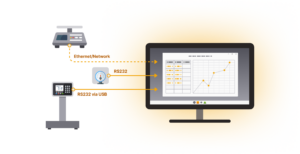
How TCP-Com Lets Legacy Serial/RS232/COM-Port Software Read Data From Newer Ethernet-Connected Devices
TALtech’s WinWedge is the best serial port communication software. It easily feed

TALtech’s WinWedge is the best serial port communication software. It easily feed
TALtech’s WinWedge is the best serial port communication software. It easily feed
TALtech’s WinWedge is the best serial port communication software. It easily feed
WinWedge Versions for Windows 11: If you’re planning to upgrade to Windows 11, your older WinWedge software may stop working properly in “Keystroke Mode” – disrupting data collection from your scales, balances, gages, sensors, meters, and other RS232, USB or
TALtech’s WinWedge is the best serial port communication software. It easily feed
Download a free version of WinWedge software. Use WinWedge to easily collect data from all your RS232, USB and network-connected devices including scales, balances, gages, meters and more.
TALtech WinWedge software links data from balances and other RS232, USB and Ethernet-connected devices directly into Excel and Windows applications.
Download a free version of WinWedge software. Use WinWedge to easily collect data from all your RS232, USB and network-connected devices including scales, balances, gages, meters and more.
Download a free version of WinWedge software. Use WinWedge to easily collect data from all your RS232, USB and network-connected devices including scales, balances, gages, meters and more.
Download a free version of WinWedge software. Use WinWedge to easily collect data from all your RS232, USB and network-connected devices including scales, balances, gages, meters and more.
Download a free version of WinWedge software. Use WinWedge to easily collect data from all your RS232, USB and network-connected devices including scales, balances, gages, meters and more.
Download a free version of WinWedge software. Use WinWedge to easily collect data from all your RS232, USB and network-connected devices including scales, balances, gages, meters and more.
Download a free version of WinWedge software. Use WinWedge to easily collect data from all your RS232, USB and network-connected devices including scales, balances, gages, meters and more.
Download a free version of WinWedge software. Use WinWedge to easily collect data from all your RS232, USB and network-connected devices including scales, balances, gages, meters and more.
TALtech WinWedge software links data from balances and other RS232, USB and Ethernet-connected devices directly into Excel and Windows applications.
TALtech WinWedge software provides data collection into Excel from serial RS232, USB and Ethernet-connected devices such as scales, balances, gages, meters and any other measuring device or laboratory instrument.
TALtech WinWedge software links data from balances and other RS232, USB and Ethernet-connected devices directly into Excel and Windows applications.
Download a free version of WinWedge software. Use WinWedge to easily collect data from all your RS232, USB and network-connected devices including scales, balances, gages, meters and more.
TALtech WinWedge software links data from balances and other RS232, USB and Ethernet-connected devices directly into Excel and Windows applications.
TALtech WinWedge software links data from balances and other RS232, USB and Ethernet-connected devices directly into Excel and Windows applications.
TALtech WinWedge software links data from balances and other RS232, USB and Ethernet-connected devices directly into Excel and Windows applications.
TALtech WinWedge software links data from balances and other RS232, USB and Ethernet-connected devices directly into Excel and Windows applications.
TALtech WinWedge software links data from balances and other RS232, USB and Ethernet-connected devices directly into Excel and Windows applications.
TALtech WinWedge software links data from balances and other RS232, USB and Ethernet-connected devices directly into Excel and Windows applications.